Keep the configuration.
Know what passed.
I built a terminal assistant to collect configurations and diagnostics, correct individual failures and save an organized backup—with a clear record of what was captured.
See the actual interfaceStart with the devices.
Review platforms, sites and groups. Assign access profiles and choose queries before connecting.
| Device | Platform | Group / address |
|---|---|---|
| edge-01 | IOS XE | Campus192.0.2.11 |
| core-01 | NX-OS | Datacenter192.0.2.12 |
| wan-01 | IOS XR | WAN198.51.100.21 |
| access-01 | IOS | Campus192.0.2.13 |
| Device | Query outcome |
|---|---|
| edge-01 | Passed · retained |
| core-01 | Passed · retained |
| wan-01 | Passed · retained |
| access-01 | Authorization denied |
Resolve access and retry the failed query. Successful captures keep their original timestamps.
- Original outputsOrganized by site and device
- JSON manifestQuery mapping, timestamps and attempts
- HTML reportPassed, failed and excluded queries
- SHA-256 checksumsFile integrity verification
A partial collection stays partial. Saving files does not establish that a backup can be restored.
70 automated tests passed. Real-device validation pending.
Inspect the validation scopeThe tool,
in your terminal.
Five steps, from inventory to a private export. These are actual application screens, rendered with synthetic data in the offline demo.
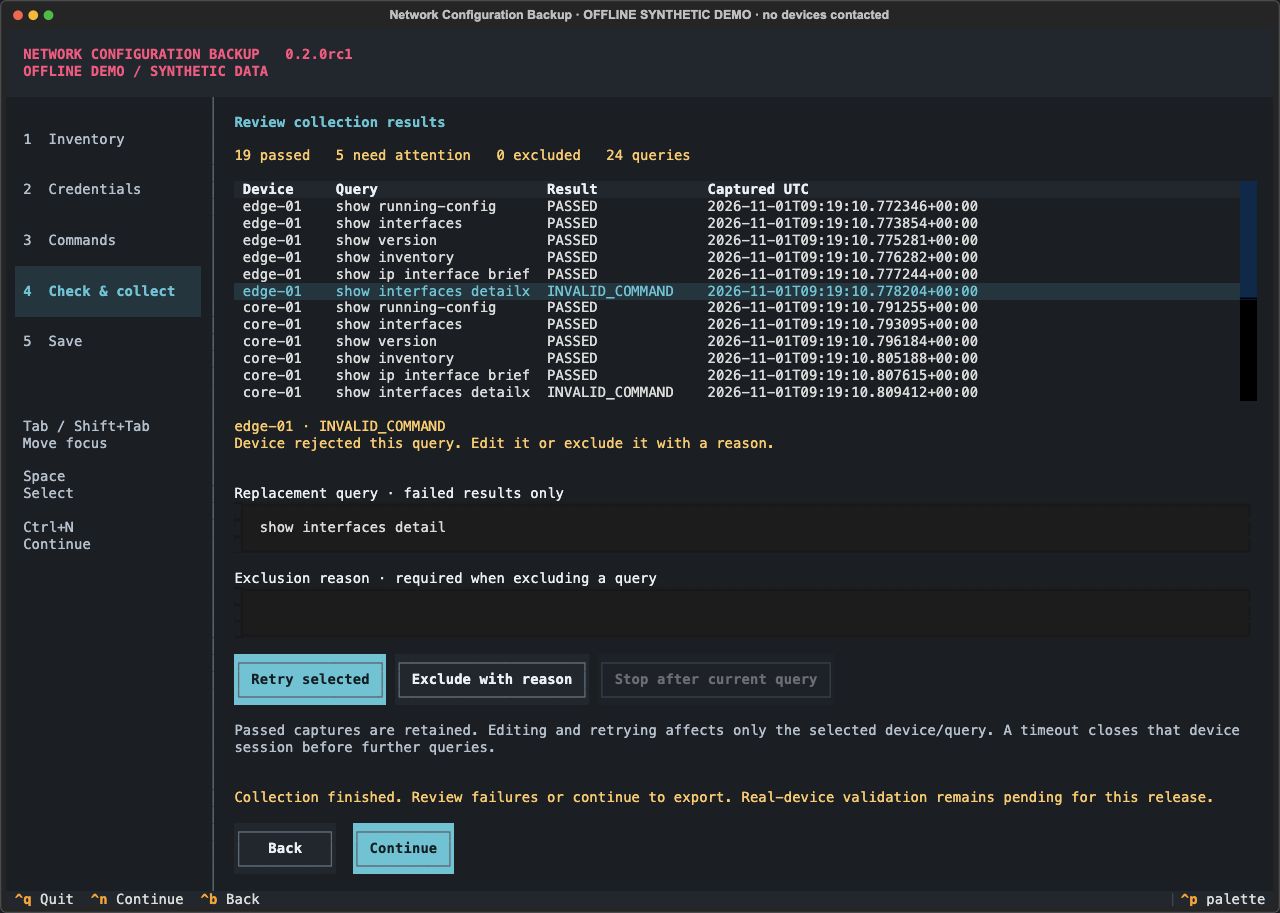
Synthetic responses show passed queries and an invalid command. Correct and retry a selected failure without repeating successful captures.
Inspect the source captureShow the result.
And its limits.
The assistant is covered by automated checks for inventory, credentials, query failures, selective retries and private exports. CI passes on Python 3.11–3.13.
Open the validation recordReal-device validation remains pending for IOS, IOS XE, IOS XR and NX-OS. Loopback SSH tests are protocol fixtures, not Cisco interoperability or restore certification.
The offline demo uses the actual Textual widgets. Its adapter cannot connect to devices. Read the capture provenance.
A passed query returned to a prompt without a recognized error. A complete collection means all selected queries passed; neither guarantees configuration completeness or restoration.
The engineering
behind the experience.
Keep the workflow familiar
Netmiko over SSH. The assistant collects recognizable CLI queries and supports custom show commands with platform-specific profiles.
Command availability, permissions and error wording vary by device and software. NETCONF is a future adapter, not an implemented fallback.
Preserve useful work after a failure
Per-query results and selective retry. Successful captures retain their timestamps while a failed query is edited or retried. A timeout closes the device session before later queries are sent.
Queries are observed at different times. This is not a transactional snapshot of the network or a guarantee that every device-specific error is recognized.
Keep originals private
Local exports and in-memory access profiles. The assistant does not upload backups or persist access passwords. Private files retain original output; metadata and checksums explain what was captured.
Configurations can themselves contain secrets. File permissions and hashes are not encryption, signatures or a secure-memory vault.
Make evidence boundaries visible
Synthetic demonstration and pending live validation. A network-free demo exercises the actual interface. Automated checks include real Netmiko exchanges with a loopback protocol fixture.
These tests do not certify Cisco interoperability, configuration completeness or restoration. Real-device checks remain a separate pending step.
A clear boundary for this preview.
No configuration deployment, restoration, scheduler, NETCONF or persistent secrets vault. The original command-line script remains supported, with strict SSH identity checks and structured export folders.
Up to 100 devices and 50 queries per device. Retained-output limits are checked after Netmiko returns. Read operations and limits.
Technology with a specific purpose.
Python and Textual provide the guided terminal. Netmiko handles SSH collection; Cisco profiles organize queries. JSON, HTML and SHA-256 preserve the collection record. GitHub Actions checks the package on Python 3.11–3.13.
Explore the code.
Review your next backup.
Network Configuration Backup · by Carlos Alvarado